Selection is your shortlist — every design you're considering, organised into three clear states: Active, Saved for later, and Not available.
Tap "Add to selection" on any design in the catalogue and it drops into this view. From here you decide what actually goes into your plan.
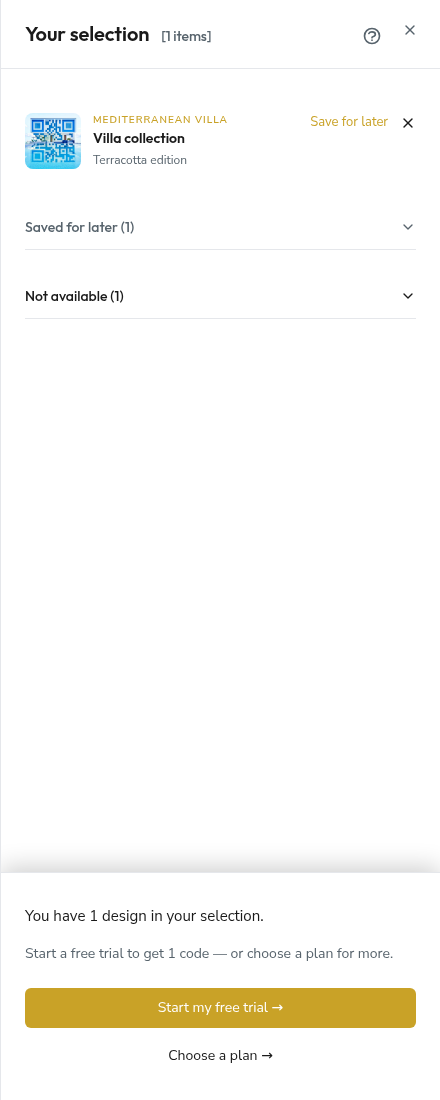
The three states
Every item in your Selection sits in exactly one of three sections.
Active
These are the designs you're ready to purchase or include in your plan right now. They count toward your plan capacity and the pricing summary at the bottom of the panel.
From an active row you can:
- Open the design's full page,
- Move it to Saved for later,
- Or remove it entirely.
Saved for later
A parking space for designs you like but aren't committing to today. Saved items don't count toward capacity or pricing. Move them back to Active whenever you're ready.
This is especially useful when you're building a plan for a listing that isn't live yet — shortlist now, decide later.
Not available
Sometimes a design you've added becomes temporarily unavailable. Two common reasons:
- Already paired with another user. Each unique QR base can host one design at a time. If another SquareBond user activated a sibling design from the same base before you, yours becomes unavailable until their situation changes.
- Reserved for a trial. When someone starts a 7-day trial with a particular design, that slot is held until the trial concludes.
Items in this section remain visible with a badge and a note so you understand why — but you can't add them to a plan until they're freed up.
Active items and plan capacity
The counter at the top of the panel ([3 items]) reflects only the Active section. When you proceed to checkout or plan assignment, that's the number that matters.
If your Active count exceeds your plan's capacity, the panel will prompt you either to move items to Saved for later or to size up to a larger plan.
Trial mode
If you're starting a 7-day trial, Selection switches into a focused mode — one active item, a "Use for trial" action on each row, and a small cancel-trial-selection link at the top. Only one design can ride with the trial; the rest stay in Saved for later until you upgrade.
Frequently asked questions
Why is a design I liked last week now "Not available"?
Because a design's underlying QR base can only host one active design at a time. If another user committed to a sibling design from the same base before you, yours becomes unavailable. It may free up later — your item stays in the Not available section as a reminder.
Do saved items expire?
No. A saved design sits in your Selection indefinitely. It's not a reservation; it's a bookmark.
If an item is unavailable, does SquareBond notify me when it frees up?
Not automatically today — this is on the roadmap. For now, the Selection panel is your place to check in.
Can I share my Selection with a teammate or client?
Not yet. Selection is per-account. Sharing flows are planned for a future release.